
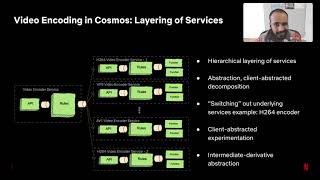

Transcoding at Scale (Netflix & YouTube Pattern)
Most consumer camera uploads are already compressed, while professional workflows may supply higher-bitrate mezzanine masters. The video transcoding pipeline validates and decodes those varied inputs, then produces multiple resolutions (1080p, 720p, 480p, 360p), bitrates, and codecs (H.264, H.265/HEVC, AV1, VP9) for playback across TVs, laptops, and mobile devices.
Distributed Pipeline Architecture
Split-and-Stitch Parallelism
Rather than encoding a 2-hour movie linearly on a single machine (taking hours), modern pipelines split the video at Keyframe (I-frame) boundaries into 5-to-10-second segments. Hundreds of ephemeral worker instances transcode segments concurrently in parallel. Every rendition must use the same keyframe and segment boundaries so players can switch cleanly. The completed segments are stitched together with an index manifest file (.m3u8 for HLS or .mpd for DASH).
Worked example: one hour of 1080p
Assumptions: a 60 minute 1080p30 upload, a 5-rung H.264 ladder, and each worker encoding one rendition at about 0.5x real time (2 seconds of work per second of video).
- Serial: 5 renditions x 60 minutes x 2 = 10 hours of encoding.
- Chunked: split into 6 second segments at keyframes: 600 segments x 5 renditions = 3,000 tasks, each about 12 seconds of work. With 300 workers the wall-clock time is about 2 minutes plus queueing, probing and packaging.
- Cost is unchanged (still about 10 CPU-hours); parallelism buys latency, not efficiency. Per-title or per-shot encoding reduces cost and bitrate for simple content.
Example bitrate ladder
| Rendition | Resolution | Video bitrate (H.264) |
|---|---|---|
| 1080p | 1920 x 1080 | about 5 Mbit/s |
| 720p | 1280 x 720 | about 3 Mbit/s |
| 480p | 854 x 480 | about 1.2 Mbit/s |
| 360p | 640 x 360 | about 0.7 Mbit/s |
| 240p | 426 x 240 | about 0.4 Mbit/s |
Codec trade-offs
| Codec | Compression versus H.264 | Encode cost | Playback support |
|---|---|---|---|
| H.264 / AVC | Baseline | Low | Universal |
| H.265 / HEVC | Roughly 25 to 50 percent smaller | Higher | Apple devices and many TVs; licensing complexity |
| VP9 | Similar to HEVC | Higher | Chrome, Android, many TVs |
| AV1 | Roughly 30 percent smaller than VP9 | Much higher | Growing hardware decode support |
Platforms commonly encode H.264 for everyone and add AV1 or HEVC only for popular titles, where bandwidth savings repay the encode cost.
Pipeline and failure handling
- Poison inputs: after N failed attempts, move the task to a dead-letter queue and mark the video failed with a reason, instead of retrying forever.
- Audio is encoded once per language and bitrate, separately from video, and muxed or referenced in manifests.
- YouTube has reported receiving over 500 hours of video per minute, which is why these pipelines are built as elastic, queue-driven worker fleets.