
Caching layers
A cache keeps an answer so the next request can avoid some work: reading a database row, calling another service, resizing an image or recomputing a report. The useful question is which work a hit removes. That determines where the copy belongs.
We’ll compare the places a cache can live, follow a read that fills one, and distinguish a database’s page cache from a disposable SQL table.
Keep the source separate
Suppose a catalog service copies product p7 into a cache. Finding a usable copy is a hit; finding none is a miss. The product database remains the source of truth. Losing the cached copy should leave somewhere to recover the answer.
That makes the copy replaceable, but does not make its contents permanently correct. If the product changes, the old copy needs a rule for when readers must stop using it. Name the allowed staleness before choosing a cache lifetime.
The key must distinguish answers that are different. A public product description might use its product ID and locale. An account’s private report also needs its account boundary; a report-name-only key could expose one customer’s data to another.
Choose the work to avoid
These layers are alternatives you can combine when each earns its place. They are not a checklist of infrastructure every request should traverse.
| Placement | A hit can avoid | What needs care |
|---|---|---|
| Client | Fetching or recomputing local data | Stale state and switching accounts |
| CDN | Sending a reusable public response from the origin | Invalidation and personalized responses |
| Gateway or reverse proxy | Running the application for a reusable response | Authorization and correct request matching |
| API process memory | A repeated lookup or computation | Separate copies and fills in every instance |
| API disk | Regenerating a larger artifact | Space limits and cleanup across deployments |
| Redis or Memcached | Repeated source lookups across instances | Network delay, outages and invalidation |
| Database buffer pool | Reading database pages from storage | Engine-specific memory management |
| Materialized view | Repeating a join or aggregation | Refresh cost and out-of-date results |
For example, our shortener design records every accepted redirect reaching the application. Caching its destination lookup preserves that write. Reusing a whole redirect before it reaches the application would bypass it.
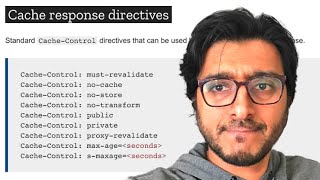
An HTTP cache also needs the response’s reuse rules, not just a URL lookup. A response that varies by a request header needs matching variants; private and public answers must not become interchangeable.
Follow a cache-aside read
With cache-aside, the application checks the cache, reads the source on a miss and saves the result for another request. This diagram follows a successful lookup of an existing product. It omits authorization and error handling to isolate the fill.
A process-local map avoids a network exchange. A shared cache lets different application instances reuse the same fill and can outlive an application restart. Shared ownership adds a dependency, so choose it when that reuse is worth the cost.
For changing data, you might delete a copy after a source update, give it a time limit, or update it through the write path. Writing both stores does not by itself make them atomic: a failure or concurrent fill can leave them disagreeing. The concurrency lesson follows that race.
A SQL-shaped cache
MySQL’s MEMORY engine offers a transient table with SQL access. It can suit a disposable derived dataset when retaining an existing schema and query shape simplifies the application. The MEMORY engine recording explores this option.
In MySQL 8.4, the rows disappear on server restart while the table definition survives. This differs from InnoDB’s buffer pool, which holds pages belonging to durable tables. A materialized view is different again: it stores a query’s results until refreshed.
MEMORY lacks transactions, uses table-level locks and cannot store TEXT or BLOB columns. Even VARCHAR occupies a fixed-length row representation. Table size is bounded by configured memory limits; extra rows do not automatically spill to disk.
SQL reuse can be convenient, but these restrictions may cost more than they save. Compare the actual queries and schema with InnoDB or direct key access before assuming an in-memory table will be faster.
For any placement, measure the avoided operation, miss cost and total response time. A high hit ratio helps only if it removes meaningful work and the answers remain usable.
The Full-Stack Caching Hierarchy
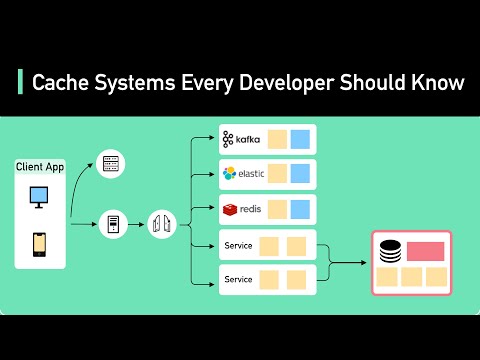
In high-throughput distributed systems, performance is governed by memory hierarchy latency: L1 CPU cache (1ns) → RAM (100ns) → NVMe SSD (100µs) → Datacenter Network RTT (500µs - 2ms) → Cross-Region Internet RTT (50ms - 150ms). An end-to-end web architecture places specialized caching layers along this pipeline to intercept requests as close to the user as possible.
The Multi-Tier Caching Flow
Under the Hood: Layer Mechanics & Headers
1. Client & Browser Cache
Governed by HTTP caching headers (RFC 9111, which obsoleted RFC 7234 in 2022):
Cache-Control: public, max-age=31536000, immutable: Used for hashed static assets (JS/CSS/images). The browser never issues a network request for the lifetime of the file.ETag: W/"33a64df5"&If-None-Match: Weak entity tags enable conditional validation. If the resource is unchanged, the server returnsHTTP 304 Not Modifiedwith zero body payload, saving bandwidth.
2. Anycast CDN Edge
CDNs (Cloudflare, Fastly, CloudFront) terminate TCP and TLS connections at hundreds of Point-of-Presence (PoP) locations worldwide. Fastly uses Varnish (VCL) in RAM, while Cloudflare uses custom Rust/Nginx proxies. Caching dynamic JSON responses at the edge can cut p95 API latency sharply for users near a PoP (for example, from around 120ms to under 15ms), but the gain depends on hit ratio and user geography.
3. In-Process L1 vs. Distributed L2 Cache
Distributed caches (Redis) incur a network hop (0.5ms - 2ms) and serialization/deserialization overhead. An in-process cache (Caffeine in Java, sync.Map or bigcache in Go) stores deserialized heap objects in application memory. Zero network overhead allows millions of reads per second on a single instance.
Worked example: what each layer buys you
Take a product page API serving 50,000 requests per second. The origin database can comfortably handle about 2,000 queries per second. Suppose the browser cache absorbs 30 percent of requests through revalidation or fresh hits, the CDN absorbs 60 percent of what remains, and an in-process L1 plus Redis L2 absorb 95 percent of what reaches the app tier.
- After the browser: 50,000 x 0.70 = 35,000 rps leave devices.
- After the CDN: 35,000 x 0.40 = 14,000 rps reach the origin.
- After L1 and L2: 14,000 x 0.05 = 700 rps hit the database, about a third of its capacity.
Now let the CDN hit ratio fall from 60 to 30 percent because someone added a per-user query string. Origin traffic becomes 35,000 x 0.70 = 24,500 rps and database load becomes about 1,225 qps. That is still survivable, but the headroom is gone. Hit ratios multiply, so a regression in one layer shows up downstream.
Layer trade-offs
| Layer | Typical latency saved | Invalidation control | Main risk |
|---|---|---|---|
| Browser / app | Full round trip | Weak: only TTL, validators, or versioned URLs | Users stuck on stale assets |
| CDN edge | Tens of ms of WAN | Medium: purge APIs, surrogate keys | Leaking personalised content, purge lag |
| Reverse proxy | App CPU | Good: you own it | Cache key mistakes, header handling |
| In-process L1 | Network hop plus deserialisation | Poor across a fleet | Inconsistent copies per instance, heap pressure |
| Distributed L2 | Database query cost | Good: single logical copy | Hot keys, outage causes miss storm |
| DB buffer pool | Disk I/O | Automatic | Evicted by large scans |
How real systems do it
- Static assets: content-hashed filenames plus
Cache-Control: max-age=31536000, immutable. You never invalidate. You ship a new URL. - Facebook puts memcache between web servers and MySQL and uses McSqueal, which tails MySQL commits, to broadcast deletes to every region.
- Fastly and Cloudflare support tag-based purge (surrogate keys, cache tags), so one product update can purge every page that shows the product.
Failure modes
- A deploy changes an API response shape, but browsers keep the old cached JSON. Version your API responses or keep TTLs short.
- An L1 without a size bound grows until garbage-collection pauses appear. Always cap L1 caches by entries or bytes.