

Byte-range indexed object storage
A byte-range read retrieves part of an object. Add an index from logical keys to byte locations, and a large dictionary or catalog can answer a point lookup without transferring its entire data file.
The application supplies the lookup logic; object storage supplies bytes. We'll translate an index entry into a range, verify a local read, then handle response validation, compression and access control.
Name the object as well as the position
The dictionary design needs an entry shaped like this:
key -> object identity, start byte, lengthObject identity must select the version used to build the index. An unchanged offset in a replaced object can return a different value with a perfectly valid length. Use immutable object names or an explicit retained version; the next lesson covers publication and cleanup.
Our exercise uses a separate color pack: red\n, green\n, then purple\n. The newline is one byte, making the values four, six and seven bytes long. This is not the previous lesson's word-meaning file.
| Key | Half-open byte slice and length |
|---|---|
| apple | [0:4]: 4 bytes |
| pear | [4:10]: 6 bytes |
| plum | [10:17]: 7 bytes |
Range: bytes=4-9. For a nonempty indexed value, the last byte is start + length - 1. An empty value needs no body read; do not turn zero length into an invalid reversed range.
Exercise the boundary
The object-storage download writes this 17-byte pack in a private temporary directory. It compares a full read with a seek to pear's offset, then tries invalid metadata and an actually shortened source file.
python3 m13-object-store.py rangespack bytes: 17 ; index: {"apple":[0,4],"pear":[4,6],"plum":[10,7]}
full: b'red\ngreen\npurple\n'
pear slice [4:10] -> b'green\n'
HTTP range spelling: bytes=4-9; returned length=6
index (-1,1): invalid indexed boundary
index (10,8): invalid indexed boundary
shortened source: truncated sourceThe helper rejects a negative offset or an interval beyond the recorded complete length. It also checks the returned byte count. A valid-looking index cannot make a shortened source return all its promised bytes.
This mode performs local file reads. Its HTTP line is calculated syntax, not a network response or an S3 measurement. Returned bytes also do not tell us the number of physical disk reads.
Check what the server actually returned
A served single HTTP range uses 206 Partial Content and a Content-Range describing the interval. An unsatisfiable range can produce 416. A server may also ignore Range and send the full representation, so sending the header does not guarantee a partial response.
For our six-byte lookup, require the expected interval and body length before decoding. Handle a full response explicitly within a bounded fallback policy, rather than passing its first bytes off as the requested value. A short body, wrong version or unexpected encoding is a failed read.
S3's GetObject supports one selected range per request, and versionId can select a retained version where versioning is supported. The server still does not know which logical dictionary key the interval represents. Our index makes that connection.
Keep compression and caching aligned
As in the format lesson, HTTP offsets refer to the encoded representation. Offsets measured before whole-file compression cannot generally locate independently decodable values afterward. Keep data uncompressed, compress each record independently, or index compressed blocks and decode the containing block locally.
A block can contain several values, so requesting one key may still fetch its neighbors. Verify the appropriate block or record checksum against trusted metadata before using it. Matching length alone misses same-length substitutions; fetching the whole object for every checksum would defeat a small-range read.
Cache frequently requested values near the API. Include the object generation and logical key in the cache identity so an update cannot reuse the old answer accidentally. Fetching nearby entries together may reduce request overhead; measure the extra bytes against the saved requests.
This pattern also suits indexed file sections and selected media chunks. It is less attractive when every request needs most of the object, or values require frequent independent updates. Separate objects give each value its own lifecycle; a pack trades that independence for one published collection.
Authorize the key before deriving the range
Accept a logical key at the API, check the caller's permission, then look up its trusted location. Allowing arbitrary object paths and byte offsets would let a caller reach neighboring data outside that key's policy.
Bound the range length, total returned bytes, retries and request rate. Check the expected content type and encoding. Storage failures remain errors; they must not become “key missing” or a cached partial value. With those boundaries in place, the index provides precise access without turning the byte store into a database.
Under the Hood: Random Access Over Large Objects
When storing massive binary assets (e.g. 100GB video files, multi-gigabyte ZIP archives, or Parquet datasets), requiring an application to download the entire file to access a small subset of bytes is unacceptable. Byte-range indexed storage enables random access within contiguous blobs using offset and length metadata.
HTTP Byte-Range Architecture
Implementation Mechanics: Sparse Indexes & Offset Maps
To serve range reads with a direct index lookup instead of a scan (sub-millisecond only for local, cached or NVMe-resident data; remote object stores typically take tens of milliseconds to first byte):
- The Index Chunk Table: Store an auxiliary index file mapping logical offsets to physical block locations. For example, a 10GB video is indexed in 4MB chunk intervals:
chunk_0 -> block_id_492,chunk_1 -> block_id_812. - The POSIX
pread()System Call: Traditionallseek()+read()modifies the kernel file pointer, making it unsafe for concurrent threads.pread(fd, buf, count, offset)performs thread-safe atomic reads at an explicit offset without locking. - Virtual File Aggregation: Engines like Facebook Haystack aggregate millions of small images into single 100GB container files. An in-memory index maps
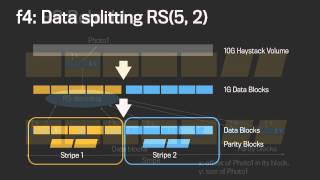
photo_id -> { haystack_file_id, byte_offset, size }, avoiding the per-photo filesystem metadata lookups (directory and inode reads) that cost extra disk I/Os.
Worked example: seeking inside a 10 GiB video
A 10 GiB (10,737,418,240 byte) file is indexed in 4 MiB chunks, giving 2,560 index entries. At about 24 bytes per entry (chunk number, storage location, length, checksum) the whole index is about 60 KB, small enough to cache anywhere.
A player seeks to byte 104,857,600 (100 MiB) and wants 4 MiB:
- Request:
Range: bytes=104857600-109051903 - Chunk number: 104,857,600 / 4,194,304 = 25, and the last byte 109,051,903 is also in chunk 25, so exactly one chunk is read.
- Response:
206 Partial ContentwithContent-Range: bytes 104857600-109051903/10737418240.
Reading a Parquet file from object storage
- Range-read the last 8 bytes: a 4-byte footer length plus the magic
PAR1. - Range-read the footer, which lists every row group and column chunk with offsets and sizes.
- Range-read only the column chunks the query needs. A query touching 2 of 50 columns may fetch a few percent of the file.
Access patterns compared
| Pattern | Bytes transferred | Requests | Best for |
|---|---|---|---|
| Whole-object GET | Entire object | 1 | Small objects, full downloads |
| Single range GET | Just the range | 1 per range | Seeking media, reading footers |
| Parallel range GETs | Entire object, split | Many concurrent | Maximizing throughput on large downloads |
| Packed volume plus offset index (Haystack) | Just the needle | 1 disk read | Billions of small blobs |
Failure modes
- Stale offsets: the object was overwritten between reading the footer and the data. Pin a version id or use conditional requests.
- Index loss: Haystack can rebuild its in-memory index from the volume file, but it keeps index checkpoint files to make restarts fast.
- Request-rate limits: thousands of small range reads can hit per-prefix request limits before bandwidth limits.