Zero-Downtime Deployment Strategies
Canary Deployments with Automated Rollbacks
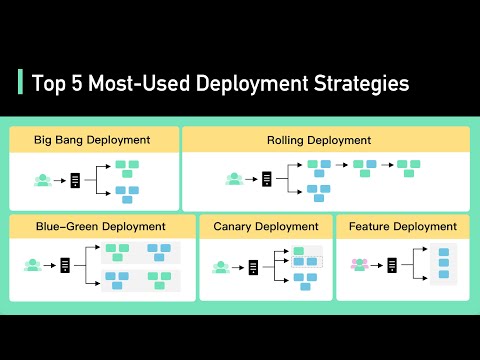
Never deploy new software to 100% of servers at once. In a canary deployment, the new release is deployed to a tiny subset of machines (e.g., 2%). The traffic router sends 2% of live production traffic to the canary. Automated monitors compare error rates and latency percentiles (p99) against the baseline control cluster. If metrics degrade, traffic is automatically shifted away from the canary. Detecting a regression needs enough samples and a bake period (often minutes), although the drain itself is fast once triggered.
Trade-offs between strategies
| Strategy | Extra capacity | Blast radius | Rollback speed | Watch out for |
|---|---|---|---|---|
| Rolling update | Small (surge of 1 to 25%) | Grows as the rollout proceeds | Minutes (roll forward the old version) | Old and new versions serve traffic together for the whole rollout |
| Blue-green | 100% (two full fleets) | All traffic at the moment of switching | Seconds (flip the router back) | Cost, warming caches and connection pools on the idle fleet, shared databases |
| Canary | Small | Canary percentage only | Seconds (drain the canary) | Needs enough traffic to be statistically meaningful |
| Feature flag / dark launch | None | Chosen per user or cohort | Instant (turn the flag off) | Flag debt, untested combinations of flags |
Worked example: is the canary actually worse?
The fleet serves 20,000 requests per second with a baseline 5xx rate of 0.1%. A 1% canary receives 200 requests per second.
- Over 10 minutes the canary serves 120,000 requests. At baseline it would produce about 120 errors.
- If the new build fails 0.5% of requests, the canary produces about 600 errors, a fivefold increase that is easy to detect.
- If the new build fails only 0.12%, you would expect about 144 errors against 120. That is within normal noise, so you need a larger canary, a longer bake time or a more sensitive signal such as latency percentiles.
Automated canary analysis tools such as Netflix and Google's Kayenta, Argo Rollouts and Flagger compare canary metrics with a control group started at the same time from the old build. Comparing against the rest of the fleet is less reliable, because instances that have been running for days carry warm caches and long-lived connections.
A staged rollout pipeline
AWS describes this approach as one-box, then single availability zone, then region-by-region waves with bake times between them, so a bad change never reaches every region at once. The same pipeline should apply to configuration and feature-flag changes, not only binaries.
Keeping old and new versions compatible
- During any rolling or canary deploy, version N and version N+1 run side by side. APIs, message formats and database schemas must be readable by both.
- Add fields before you use them, and stop using fields before you remove them (see the expand-and-contract lesson).
- Avoid deploying on Friday evening, when fewer people are around to watch the rollout.