
Under the Hood: Consumer Lag & Little's Law
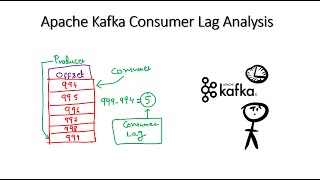
In distributed message processing, Consumer Lag is the delta between the latest message produced to a partition (the latest offset a consumer can read: the high watermark, or the last stable offset under read_committed; lag tools often label this the log-end offset) and the latest message offset committed by the consumer group:
Consumer_Lag = Log_End_Offset - Current_Consumer_OffsetOffset lag is one useful indicator, but oldest-event age, arrival and service rates, retry volume, partition skew, and downstream latency are often needed to explain user-visible delay. For a stable system over a defined window, Little's Law (L = λ W) relates average in-flight work, throughput, and average time in system. If arrivals exceed service capacity, the system is not stable: backlog and age continue growing until capacity increases, intake is limited, or work is shed.
Consumer Lag and Auto-Scaling Loop
Backpressure & Flow Control Strategies
When downstream consumers cannot keep up with upstream producers, the system must exert Backpressure rather than crashing:
- Pull-Based Flow Control: Unlike push delivery with no limit on unacknowledged messages (RabbitMQ bounds this with consumer prefetch via
basic.qos, and SQS is itself pull-based), Kafka consumers pull batches of records usingpoll(Duration timeout), with the batch size capped by themax.poll.recordssetting. Workers dictate their own ingestion rate based on available processing capacity. - Dead-Letter Queues (DLQ): If a poisoned message repeatedly causes worker crashes or exceeds retry thresholds, the consumer routes it to an isolated DLQ topic and advances its offset, preventing a single poisoned message from stalling the entire consumer group.
Worked example: how long until we catch up?
A topic receives 20,000 messages per second. Ten consumers each process 2,500 per second, 25,000 in total. A deploy pauses consumption for 5 minutes.
- Backlog built up: 20,000 x 300 s = 6,000,000 messages.
- Net drain rate: 25,000 - 20,000 = 5,000 per second.
- Time to drain: 6,000,000 / 5,000 = 1,200 s = 20 minutes, four times longer than the outage.
- Scale to 20 consumers (if there are at least 20 partitions): drain at 50,000 - 20,000 = 30,000 per second, done in 200 s.
- With only 12 partitions, 12 consumers give 30,000 capacity and a 10,000 per second net drain, so 10 minutes. Consumers beyond 12 do nothing.
Little's law cross-check: at steady state, 20,000 messages per second arriving with an average of 50 ms in the system means about 1,000 messages in flight. A lag of 6 million means that much excess backlog on top of normal.
Metrics that matter
| Metric | What it tells you | Caveat |
|---|---|---|
| Offset lag per partition | Messages behind | Not comparable across topics with different processing costs |
| Time lag (age of the oldest unconsumed message) | User-visible delay | Needs timestamps. Burrow and Kafka Lag Exporter estimate it |
| Consume rate against produce rate | Whether lag is shrinking | Look at trends, not snapshots |
| Rebalance count | Group instability | Frequent rebalances stall consumption |
| DLQ and retry topic rate | Poison or failing messages | Retries can hide lag in another topic |
Levers when lag grows
- Scale out, up to the partition count. Adding partitions later remaps keys, so plan for peak throughput up front.
- Batch downstream writes: one bulk insert of 500 rows instead of 500 single inserts.
- Fix slow handlers: tune
max.poll.recordsandmax.poll.interval.msso slow batches do not trigger rebalances. - Shed or defer: drop low-value events, such as analytics pings, during incidents.
- Autoscale on lag: KEDA's Kafka scaler targets lag per partition. Cap maximum replicas at the partition count.